Hex to Text Explained: ASCII, UTF-8 and Common Decoding Errors
Turn hexadecimal bytes into readable text, understand ASCII and UTF-8, and diagnose incomplete bytes, invisible characters and decoding errors with worked examples.

A log contains 48 65 6C 6C 6F. Another contains C3 A9. The first becomes “Hello,” while the second can become “é” or fail, depending on how you decode it. Hexadecimal makes the underlying bytes easy to inspect, but it does not tell you which text encoding produced them.
This guide walks through both stages, explains common errors and gives you small examples you can verify. Use the Genory Hex to Text Converter alongside the examples to inspect the byte count and control characters. It supports UTF-8 and strict ASCII, with conversion performed locally in your browser.
What does hexadecimal actually represent?
Hexadecimal uses sixteen digit values: 0–9 and A–F. Each digit represents four bits, so two hex digits represent one eight-bit byte, from 00 to FF. For example, 48 is the byte value 72 in decimal: four groups of sixteen plus eight. Uppercase and lowercase hex letters describe the same values.
RFC 4648’s Base16 section defines this two-symbol representation of each byte. Separators and prefixes are extra formatting choices made by a tool or protocol. A space between byte pairs improves readability; it is not itself part of the byte sequence being represented.
Keep the role of the value in view. A byte in a text payload might be part of a character, while a byte in an image or compressed file may be part of entirely different data. Before decoding, ask where the bytes came from: a text field, a file, a network message, or a digest displayed by another program.
Convert hex to text: a worked “Hello” example
- Start with 48 65 6C 6C 6F. There are five complete byte pairs.
- Parse each pair as a base-16 number: 72, 101, 108, 108 and 111.
- Interpret those values using ASCII or UTF-8. They correspond to H, e, l, l and o.
- Read the result as Hello. The formatting spaces in the hex input do not become spaces in the output.
| Hex byte | Decimal value | Text |
|---|---|---|
| 48 | 72 | H |
| 65 | 101 | e |
| 6C | 108 | l |
| 6C | 108 | l |
| 6F | 111 | o |
Try adding 20 between the first two pairs: 48 20 65 6C 6C 6F becomes “H ello.” That is a real space byte. This small change helps distinguish formatting around a representation from actual data inside the payload. When investigating a bug, record the exact byte sequence rather than relying only on how the text looks.
Hex to ASCII versus hex to UTF-8
ASCII uses the range 00–7F for its 128 codes, including letters, digits, punctuation and control characters. The code table in RFC 20 gives the original network interchange representation. A strict ASCII decoder should reject bytes beyond that range; “extended ASCII” is not one universal encoding you can safely assume.
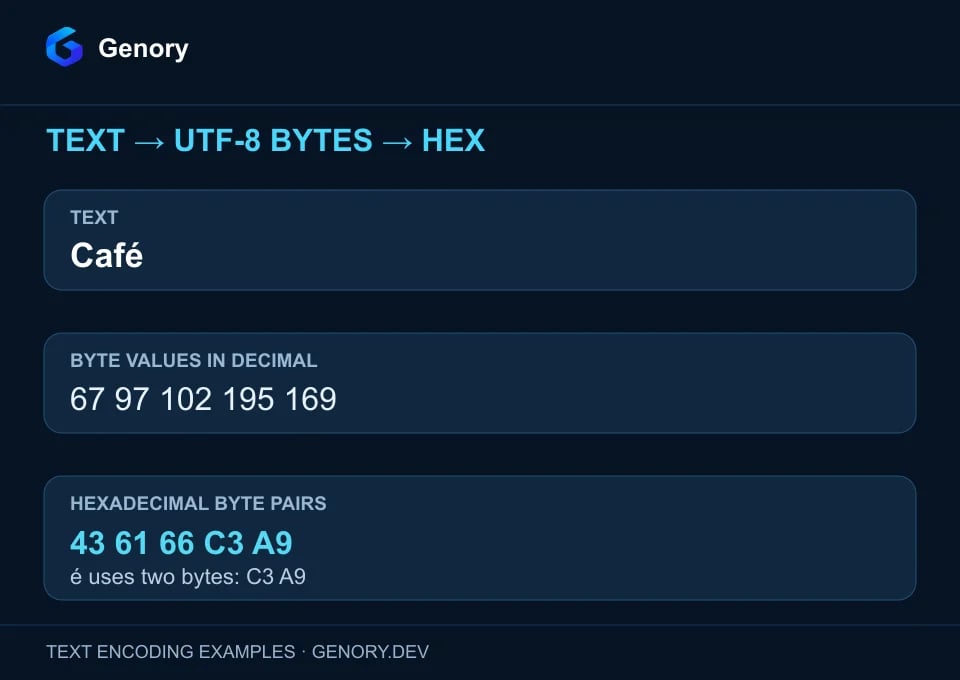
RFC 3629 describes UTF-8 as variable-length sequences of one to four bytes for Unicode scalar values. ASCII values keep their familiar single-byte representation. Beyond that range, several bytes can work together to represent one code point. You cannot decode those bytes independently as individual letters.
| Text or control | UTF-8 hex | Byte count | Strict ASCII |
|---|---|---|---|
| A | 41 | 1 | Supported |
| Hello | 48 65 6C 6C 6F | 5 | Supported |
| é | C3 A9 | 2 | Rejected |
| € | E2 82 AC | 3 | Rejected |
| 👋 | F0 9F 91 8B | 4 | Rejected |
| Line feed | 0A | 1 | Supported control character |
A code point is not the same thing as its bytes
The notation U+00E9 identifies the Unicode code point for é. The UTF-8 bytes are C3 A9. Pasting 00 E9 into a UTF-8 decoder does not mean “decode U+00E9”: it supplies a null byte followed by a byte that cannot complete a valid sequence on its own. Choose whether you are inspecting code points or encoded bytes before selecting a tool.
The Unicode encoding FAQ explains how encoding forms map code points to byte sequences. A visible symbol can also contain multiple code points, so the number of displayed symbols does not necessarily equal the number of bytes. Our emoji testing article explores that separate topic in more depth.
Use the converter without losing the original evidence
Paste a small sample into the Hexadecimal field and begin with the encoding documented by the data source. UTF-8 is a useful starting point for modern Unicode text, but it is not a detector for every possible file format. Genory also lets you edit the Text field to inspect the corresponding bytes.
The converter accepts continuous hex, complete separated byte pairs and supported byte prefixes such as 0x48. It does not import a full hex dump with address offsets and a right-hand text column. Extract only the byte column first; otherwise a value meant as an offset could accidentally become part of your input.
Why does hex decoding fail?
| Input or symptom | Likely issue | Useful next check |
|---|---|---|
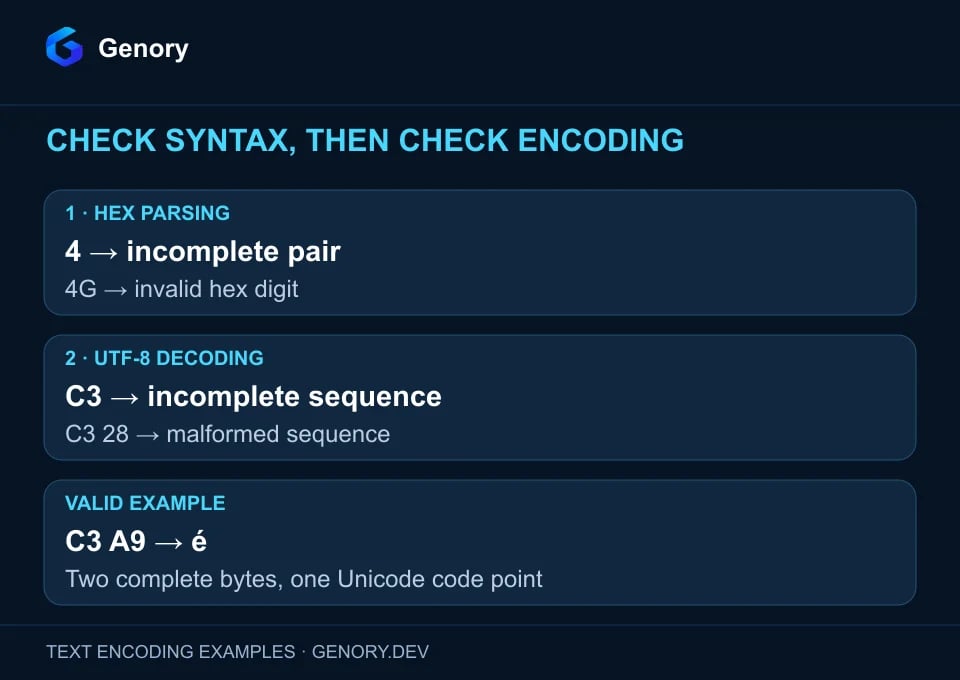
| 4 | Incomplete hex byte | Recover the missing digit from the original source |
| 4G | Invalid hex digit | Check for transcription or formatting errors |
| C3 | Complete byte, incomplete UTF-8 sequence | Check whether the payload was truncated |
| C3 28 | Malformed UTF-8 sequence | Verify the source encoding and intact bytes |
| FF in strict ASCII | Byte outside the ASCII range | Check the encoding or binary format |
| Readable prefix followed by errors | Mixed content or a damaged payload | Inspect boundaries and source metadata |
| Valid output that looks wrong | Possibly a different encoding or already-corrupted text | Compare with a known original value |
Hex syntax and text validity are separate checks
A parser can successfully produce the byte C3, but a UTF-8 decoder needs more information to finish that sequence. Likewise, changing C3 28 to C3 A9 would make a valid example without proving that é was the intended original character. A successful decode tells you that the sequence fits the chosen encoding, not that your guess matches the source.
Genory uses strict decoding and reports malformed UTF-8. The WHATWG Encoding Standard defines the browser decoding machinery, including fatal error handling. This behavior is helpful during investigation because it keeps an invalid sample visible as a problem rather than quietly giving you altered text.
Recognize replacement characters and encoding mismatches
Other decoders may insert � when they cannot interpret some bytes. TextDecoder’s fatal option controls whether malformed input throws or uses that replacement character. If an upstream system has already replaced a value, converting its replacement text to hex cannot recover the discarded original bytes.
An encoding mismatch can also produce plausible-looking characters instead of an error. For example, UTF-8 bytes for é interpreted as Windows-1252 produce “é.” Track down the first boundary where the value changes: source export, transport, import or display. Repeatedly converting the corrupted string can hide the original mistake behind additional layers.
Inspect invisible characters: line breaks, nulls and BOM
Two values can look identical in a log while differing at the byte level. A trailing line feed, tab or null may affect a parser, comparison or downstream field. Use a hex view to answer a specific question: is there an extra byte, where is it, and which stage introduced it?
| Meaning | Hex bytes | What to inspect |
|---|---|---|
| Space | 20 | Leading, trailing or repeated spaces |
| Tab | 09 | Field separators and indentation |
| Line feed (LF) | 0A | Single-byte line endings |
| Carriage return + line feed (CRLF) | 0D 0A | Two-byte line endings |
| Null | 00 | Unexpected separators or terminators |
| UTF-8 BOM | EF BB BF | A leading encoding signature |
A UTF-8 BOM represents U+FEFF and is an encoding signature rather than an instruction to reorder UTF-8 bytes. The Unicode FAQ explains its role. Genory preserves it and other supported controls; its visible-control option exposes escape-style labels for inspection. Copying the result preserves the raw converted text, so those display labels are not a cleaned replacement payload.
When testing a CSV export, for example, compare the beginning of the file and its line endings before changing the reader configuration. A byte-level observation makes the support report actionable. Our CSV export testing guide covers the broader round trip, including the importer that must read your output.
Small JavaScript examples you can verify
Decode complete hex byte pairs as UTF-8
This compact example accepts only continuous hex or whitespace-separated pairs. Its input grammar is deliberately narrower than Genory’s converter. Syntax validation happens before parseInt, and the decoder rejects malformed UTF-8. It preserves a leading BOM; applications that intentionally consume the signature can choose different handling.
function decodeHexUtf8(hex) {
  // This example accepts complete byte pairs separated by spaces.
  const compact = hex.replace(/\s+/g, '');
  if (!/^(?:[0-9a-fA-F]{2})*$/.test(compact)) {
    throw new Error('Expected complete hexadecimal byte pairs');
  }
  const bytes = Uint8Array.from(
    compact.match(/../g) ?? [], pair => parseInt(pair, 16)
  );
  return new TextDecoder('utf-8', {
    fatal: true,
    ignoreBOM: true // Keep a leading U+FEFF in the returned string.
  }).decode(bytes);
}

console.log(decodeHexUtf8('48 65 6C 6C 6F')); // Hello
console.log(decodeHexUtf8('C3 A9'));          // é
// decodeHexUtf8('4');    // Invalid hex: incomplete byte
// decodeHexUtf8('C3');   // Valid hex, but incomplete UTF-8
// decodeHexUtf8('C3 28');// Valid hex, but malformed UTF-8
Encode text and count the resulting bytes
TextEncoder.encode returns UTF-8 bytes in a Uint8Array. The example uses Café to show why byte counts and JavaScript string lengths differ. For input that may contain unpaired UTF-16 surrogates, validate those separately; TextEncoder can replace them, while Genory rejects them to avoid silent changes.
const text = 'Café';
const bytes = new TextEncoder().encode(text);
const hex = Array.from(bytes, byte =>
  byte.toString(16).padStart(2, '0').toUpperCase()
).join(' ');

console.log(hex);          // 43 61 66 C3 A9
console.log(bytes.length); // 5 bytes
console.log(text.length);  // 4 JavaScript string units
Keep both positive and negative cases in your tests: a known word, an accented value, a supported control, an incomplete pair and malformed UTF-8. Assert the expected bytes as well as the displayed output. A round trip using the same faulty assumption on both sides can look reassuring while missing an interoperability problem.
Hex is a representation, not encryption
Hexadecimal formatting adds no secrecy. Anyone with the representation can recover its bytes. Those bytes may contain plain text, but they could also contain ciphertext, a hash digest, a compressed stream or an image. Converting the representation does not supply a decryption key or reverse the computation that created a digest.
As a practical rule, confirm the payload type before asking a text converter to interpret it. If a field is documented as a binary digest, readable prose is not the expected result. Inspect the byte length and compare the value with the expected format; do not assume that a UTF-8 error means the digest itself is invalid.
A short checklist for a reliable investigation
- Save the original hex and identify its source and payload type.
- Extract only the intended bytes, keeping offsets and formatting separate.
- Confirm complete pairs and check the byte count against the expected payload.
- Use the documented character encoding and record any strict-decoding error.
- Inspect control characters and the file or message boundaries.
- Compare a known sample at each processing stage, then save a minimal reproducible case.
Frequently asked questions
Does removing the spaces change the text?
Formatting spaces between hex pairs do not change the byte values. A represented space byte, 20, does change the decoded text. Make sure your tool accepts the input notation before removing or rearranging anything.
Can every hex string become readable text?
No. Hex can represent arbitrary bytes, while a text decoder accepts the sequences defined by its selected encoding. Even valid text can contain invisible controls or characters your font cannot show.
Is my input uploaded to Genory?
The Hex to Text Converter performs conversion locally in the browser, without uploading or saving the input, and does not require an account. Start with the converter, preserve your original sample and use the byte count to check what actually changed.