
IBAN validation: what a passing check really means
Understand IBAN structure, check digits and national rules without confusing format validity with account verification.
What does an IBAN validator actually prove?
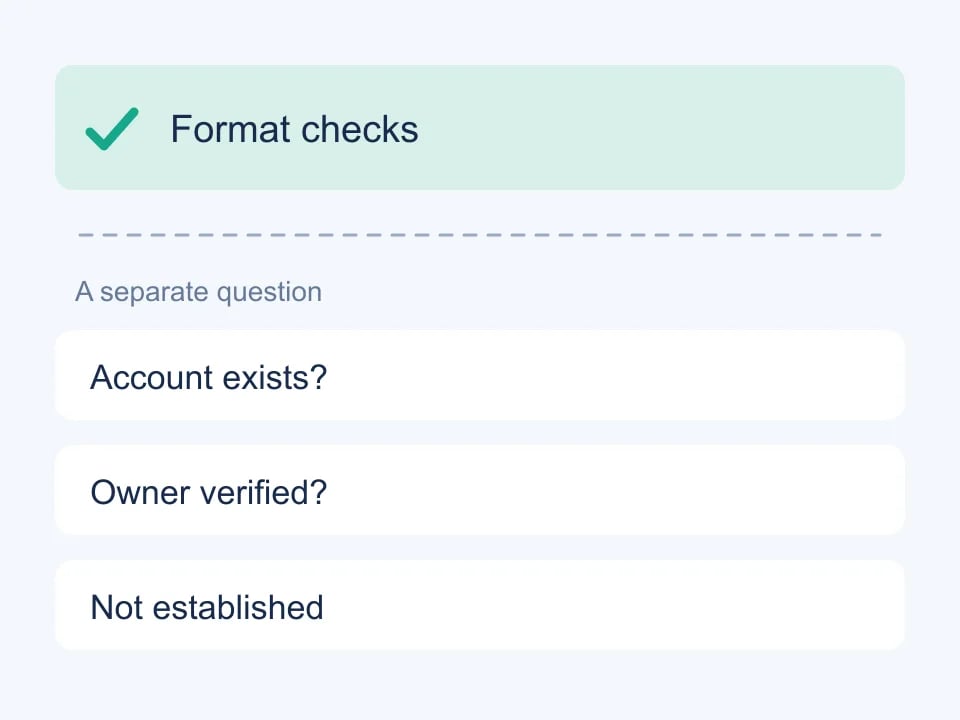
An IBAN field often looks simple: enter a value, show a green check and continue. The difficult part is deciding what that green check means. An application may have checked the country prefix, the expected length and the international check digits. That is useful evidence about the string. It is not evidence that an account exists, is open, belongs to a particular person or can receive a payment.
For developers building forms and financial test workflows, separating these questions prevents misleading interface messages. Prefer a specific result such as “format and check digits passed” over a broad promise such as “bank account verified.” The latter describes a different process involving an appropriate financial service and, depending on the use case, additional information supplied by the account holder.
Read the structure in layers
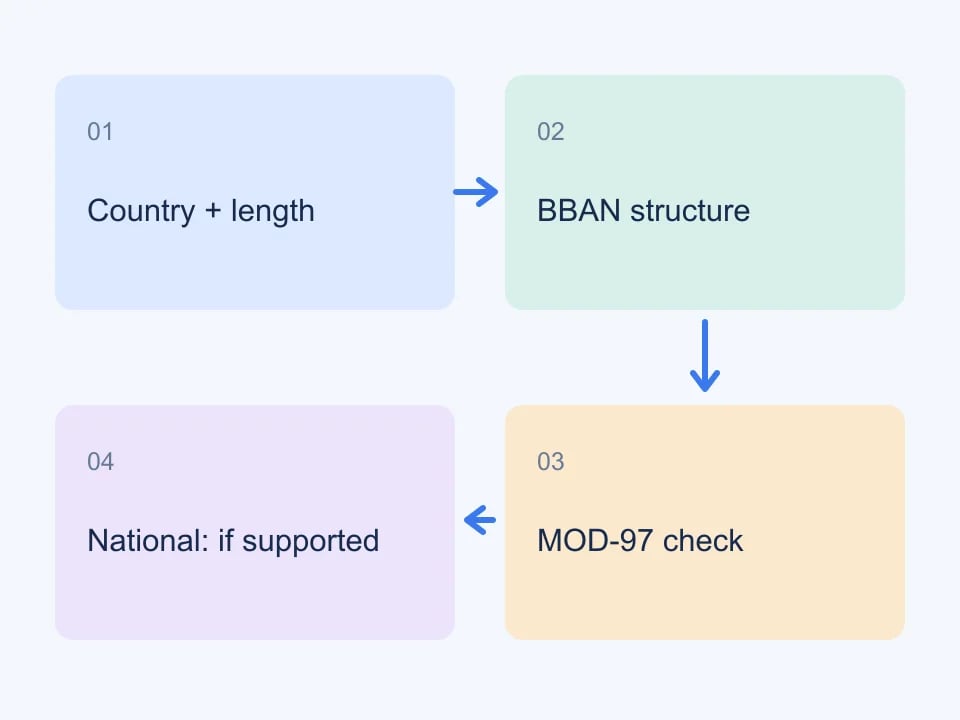
At a high level, an IBAN begins with a country code and check digits, followed by a country-specific basic bank account number, or BBAN. Countries use different lengths and internal structures. Some fields are numeric, some are alphabetic, and the positions of bank and branch identifiers are not universal. A single generic regular expression cannot capture every national rule.
The SWIFT IBAN Registry is the reference for registered country formats. Use an identified registry version when maintaining software, and document when it was reviewed. A format definition and a directory of banks solve related but distinct problems: one describes the structure of an identifier, while the other supplies information about institutions.
Validate in a useful order
Begin with input normalization that your product explicitly supports. Removing display spaces is usually more helpful than rejecting a value copied from a document. Preserve the original input when the user needs to correct it, and explain normalization rather than silently changing unrelated characters. Next identify the country and check its supported structure before applying the checksum logic.
- Recognize the country code and determine whether its format is supported.
- Check the total length for that country.
- Check the expected numeric and alphabetic BBAN positions.
- Apply the international check-digit calculation.
- Apply additional national checks only where they are implemented and maintained.
- Report unavailable checks separately from failed checks.
MOD-97 worked example: what the arithmetic checks
Use the public German registry example DE89370400440532013000 for this isolated calculation. Move its first four characters to the end: 370400440532013000DE89. Replace letters with their numeric values, A=10 through Z=35: D becomes 13 and E becomes 14. The resulting digits are 370400440532013000131489. Their remainder on division by 97 is 1, which is the expected validation result.
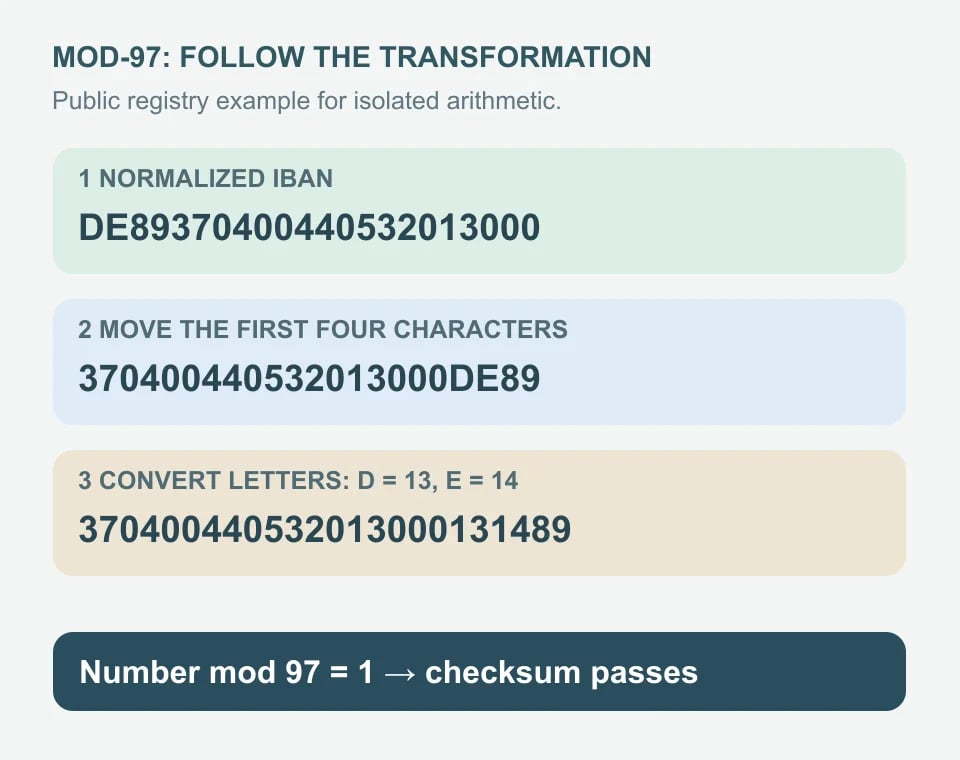
To calculate the check digits for this already specified country and BBAN, use 00 instead of the check digits before the same rearrangement. The remainder for 370400440532013000131400 is 9; 98 minus 9 gives 89. Preserve leading zeros when formatting a two-digit result. This demonstrates arithmetic, not a method for discovering a customer’s account details.
JavaScript Number cannot exactly represent every integer this large. A digit-by-digit remainder avoids that precision problem. The function below accepts normalized ASCII input and computes the international checksum layer only; use separate country-length, national-pattern and applicable domestic checks.
function ibanChecksumOnly(iban) {
  if (!/^[A-Z]{2}[0-9]{2}[A-Z0-9]+$/.test(iban)) return false;
  const check = Number(iban.slice(2, 4));
  if (check < 2 || check > 98) return false;
  let remainder = 0;
  for (const char of iban.slice(4) + iban.slice(0, 4)) {
    const digits = /[A-Z]/.test(char)
      ? String(char.charCodeAt(0) - 55) : char;
    for (const digit of digits) remainder = (remainder * 10 + Number(digit)) % 97;
  }
  return remainder === 1;
}
The example’s country structure is documented in the SWIFT IBAN Registry. For the complementary test cases, see test IBAN examples and the QA checklist.
Build fixtures for each layer
A good test suite contains more than one passing example. You want a fixture that fails at each meaningful layer, with an expected explanation. Change the country prefix to an unsupported value. Remove a character. Put a letter in a numeric position. Alter a digit in a value that otherwise has the right structure. Each exercise should demonstrate that your application identifies the actual problem rather than displaying a generic failure.
Keep a passing control next to each negative case. That makes it easier to see whether a new validation rule improves coverage or accidentally rejects an existing supported format. In automated tests, name fixtures after their purpose. A label such as “wrong length for Denmark” conveys more information than “invalid account number three.”
Why generated examples need careful labels
A synthetic IBAN can have the right length, structure and check digits without representing an actual account. It can also accidentally coincide with an account identifier. Never use generated examples as payment destinations or as substitutes for payment-provider sandbox fixtures. If your integration needs a successful simulated transfer, use the explicit test data documented by that provider.
Genory's IBAN test data tool distinguishes generated formats and specification examples, and shows limitations where national validation is incomplete. The IBAN validator reports the checks it can perform. These tools are intended to help you test your application, not to establish ownership or enable transactions.
Checksum validity is a property of an identifier. Account existence is a separate question.
Bank selection improves context, not certainty
Selecting a real bank can help you create a coherent form demonstration. It may align a bank code, institution name and related reference information. It still does not prove that the synthetic account portion has been assigned. Treat the selected institution as contextual test data and keep the generated-account label visible in shared screenshots or fixtures.
Bank information also changes over time. Mergers, branch closures and changes in routing arrangements can make a once-useful directory entry incomplete. Version your source data and review update procedures before depending on bank selection in a production onboarding flow. If a field is missing, display an honest unavailable state instead of constructing an address or branch name that looks authoritative.
Design helpful form feedback
Users need to know what they can fix. If the country has the wrong expected length, say so near the field. If a format is unsupported, distinguish that from an invalid value. Avoid exposing a long technical explanation as the primary error message; offer details below the main result for developers and support staff who need them.
The success state deserves equal care. Pair a concise status with a description of the checks performed. For example, a developer-facing panel can list country recognition, length, BBAN structure and checksum results independently. That approach also handles partial coverage: an unavailable national check does not need to erase the useful results from the checks that did run.
Match the error to the failed layer
| Finding | Explain to the user | Next step |
|---|---|---|
| Unsupported characters | The IBAN contains characters this form cannot accept | Compare the original and remove accidental punctuation |
| Country length mismatch | The number of characters does not match the country format | Check that the complete value was copied |
| National pattern mismatch | A section contains the wrong kind of character | Compare with the bank-issued details |
| Checksum failure | The IBAN failed its mathematical consistency check | Recheck the complete value; do not guess new digits |
| Unsupported payment destination | This payment route does not support the destination | Ask the provider about an available route |
| Provider verification failed | The provider could not accept or verify the account | Follow its correction or support process |
Do not claim that the checksum identifies the exact wrong digit. Keep internal codes stable, but write messages in ordinary language. A structurally acceptable account can still be outside a product’s supported route or require separate beneficiary verification. Preserve that distinction in the result shown to users.
Keep validation consistent across layers
Client-side checks can make a form responsive, but the server should enforce the rules that determine whether a request is accepted. Otherwise, a direct API request can bypass the interface. Share the same format definitions where practical, and maintain integration tests for accepted and rejected requests. Test whitespace normalization and lowercase input through the public API as well as through the browser.
When the rules change, review stored fixtures and error messages together. A new supported country should appear in the selector, the documentation and relevant test cases. A limitation should appear wherever its result is consumed. Consistency is what lets a support team explain a result without having to guess which validation path produced it.
Finally, keep a clear boundary between development utilities and banking decisions. Use synthetic data for demonstrations, interface tests and controlled integration exercises. Use the appropriate provider's verification process when real account details matter. That boundary gives both developers and users a more accurate understanding of what a passing IBAN check can—and cannot—tell them.
| Layer | What it can establish |
|---|---|
| Country and length | Fits a registered format |
| MOD-97 | Check digits agree with the value |
| National checks | Implemented local rules pass |
| Account existence | Not verified |